As an Amazon Associate I earn from qualifying purchases. Links marked “Affiliate link” may earn us a commission at no extra cost to you. Learn more.
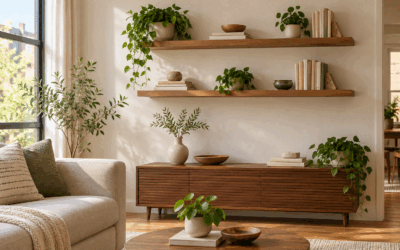
Choose a media console cabinet by measuring the wall, the cabinet’s full width and depth, and the open floor needed to reach nearby doors or seating. Drawers conceal small items, while open shelves keep equipment accessible. A slim console suits a narrow wall, and a deeper cabinet works only if it does not block the room’s main path. Treat 36 inches of clear route as a useful accessibility yardstick, not a universal home requirement. Check each listing’s dimensions carefully before deciding.
Quick compare: the products in this guide
Sizes come from the Amazon listings as we read them; check the product page for the current details before you buy.
| Product | Listed details | Link |
|---|---|---|
| WLIVE 58″ TV Stand for 65 Inch TVs, Black Media Console with Metal Legs | 57.87L*14.57W*17.71H; 39 pounds | See details on Amazon Affiliate link |
| HOOBRO TV Stand with Power Outlets to 75 Inches, TV Console Table with Open… | 15.7″D x 70.9″W x 20.5″H; 130 pounds | See details on Amazon Affiliate link |
| CHOEZON Media Cabinet with Charging Station, Stereo Cabinet with Wheels,… | 23.6″L x 19.7″W x 31.1″H | See details on Amazon Affiliate link |
Why a media console cabinet matters in a small space
A media console has to do more than support a screen. In a compact room, its depth can affect the route between seating, doors, and other furniture. A cabinet that looks narrow in a product photo may still project far enough into the room to make a passage feel crowded. Measure the footprint on the floor before choosing a style.
Storage also affects how large the room feels. Closed drawers hide remotes, cables, and small accessories; open shelves make devices easier to reach but keep them visible. The right balance depends on what you use each day and whether the cabinet will also store items unrelated to the television.
Think about the whole wall, not just the cabinet. A television, floor lamp, speakers, and nearby seating all compete for space. A longer console might visually anchor the screen but leave less wall for other pieces. A narrow model can open up floor area, although its storage may be more limited. Decide which functions matter most before comparing finishes.
Some shoppers search for media cabinets and consoles, a contemporary media cabinet, or a modern media cabinet. Those labels are useful for narrowing the look, but they do not replace measurements. A piece called a console cabinet for an entryway may not be designed for media equipment, and an appealing finish does not guarantee a useful storage layout. Confirm the product description and dimensions.
Key measurements for a media console cabinet
Measure the intended wall from corner to corner, then note the space occupied by outlets, trim, heating equipment, and door openings. Record the cabinet width along that wall and its depth from the wall into the room. Keep those axes separate: width uses the wall, while depth uses the floor extending into the room.
Then check the route past the cabinet. The US Access Board describes 36 inches as the minimum clear width for an accessible route and allows 32 inches for short stretches such as doorways. Use those figures as a yardstick, not as a rule that every home must follow. A household may need a wider route for comfortable movement or mobility equipment.
Measure the screen and its base as well. The console top should accommodate the base without overhang, and the screen should suit the distance from the seating. Check whether the cabinet’s stated width refers to the top, body, or full outside dimension. If a listing gives conflicting dimensions, do not assume which figure is correct; ask the seller or check the listing carefully.
Record practical details alongside the footprint: the number of drawers and shelves, whether the shelves are open, and whether cables can pass through the back. For a cabinet with doors, allow room to open them. For one with drawers, consider whether a sofa or table will interfere with pulling them out. A skinny console cabinet can still be awkward if the path to its storage is blocked.
Types and materials to compare
A low television console usually places the screen at a seated viewing height and spreads storage across the wall. A taller media cabinet may offer more enclosed storage in a smaller floor footprint, but it can create a heavier visual block. Compare the height with the screen position and the rest of the room rather than selecting by style label alone.
An open-shelf design suits equipment that needs to remain accessible. A design with drawers can conceal clutter, though the drawer fronts need space to open. Some cabinets combine the two. Count the storage you will actually use instead of assuming that more compartments always mean a better fit.
Color and finish can help a piece blend in or stand out. A black media cabinet may visually recede against a dark wall, while a white media cabinet can feel lighter against a pale one. A corner media cabinet can make use of an otherwise awkward corner, but check both the wall lengths and the cabinet’s shape; a rectangular unit may not sit neatly in every corner. A floating media cabinet frees floor area beneath it, but installation and wall suitability matter. Follow the manufacturer’s mounting instructions.
Check materials and assembly details in the product listing. Do not assume that a wood-look finish is solid wood, or that a product has a particular load rating unless the listing states it. If the listing does not provide a detail you need, check the listing or contact the seller. Keep heavy items within the stated limits, and follow the manufacturer’s guidance for assembly and use.
Fitting a media console cabinet on a wall
Take a room that is 12 ft wide along the television wall and 10 ft deep from that wall to the opposite side. The 12 ft wall equals 144 in because 12 ft × 12 in per ft equals 144 in.
Suppose the chosen cabinet is 57.87 in wide and 14.57 in deep. Those dimensions are listed for one black media console. Check the listing for the exact product before buying; this arithmetic only illustrates how to assess a footprint.
Step 1, find the wall space left beside the console. 144 in minus 57.87 in equals 86.13 in. If centered, divide that remaining total equally: 86.13 in ÷ 2 equals 43.065 in on each side. The console therefore fits along the 12 ft wall, with about 43.07 in remaining on either side when centered.
Step 2, assess the depth into the room. The cabinet projects 14.57 in from the television wall into the 10 ft room depth. The room depth is 120 in because 10 ft × 12 in per ft equals 120 in. 120 in minus 14.57 in equals 105.43 in of depth beyond the cabinet. That is not a walkway measurement by itself; other furniture and the actual route still need to be included.
Step 3, sketch the route at the narrowest point. If a planned passage measures 40 in across, compare it with the 36 in accessibility yardstick. 40 in minus 36 in equals 4 in of additional clearance. This is only a rough check: measure after accounting for seating, tables, and door movement. A door swing follows an arc based on the door’s width, not its thickness, so include that arc when it overlaps the route.
This example uses the room width only for the wall and room depth only for projection into the room. It does not subtract a walkway from the wall length or count the same clearance twice. Before moving furniture, repeat the sketch with your own measured dimensions and the full footprint of every nearby item.
Who should buy a media console cabinet
A media console cabinet suits someone who wants a dedicated place for a television and media accessories, and has measured a wall that can accommodate its width. It can also help organize a room where small devices, remotes, or cables currently lack a home.
Choose an open-shelf layout if easy access and visible equipment are priorities. Consider drawers if you prefer to hide small items. A cabinet with a compact depth may be worth considering when the route behind seating is tight, but verify the dimensions against your floor plan rather than relying on words such as “slim.”
For occasional extra storage, consider whether the furniture needs to hold equipment at all. A cabinet intended for entryway storage may be a better match for keys and bags, while a TV media cabinet should suit the screen and devices you plan to place on it. For narrow entryway inspiration, see narrow console tables for small entryways.
Who should skip it
Skip a particular console if its depth leaves too little room for your planned route, its width does not fit the wall, or its storage does not match your equipment. Do not choose a piece solely because its title mentions a large television; check the actual listed dimensions and any stated support limits.
A floor-standing console may not suit someone who specifically wants a floating unit. Likewise, a low, wide television stand is not automatically a substitute for a taller enclosed media cabinet. If you need a corner fit, verify the cabinet’s shape and measurements instead of assuming a rectangular console will work.
If a listing contains inconsistent dimension details, pause before buying. One listing in this roundup gives different overall dimensions in separate fields, so its measurements should not be used as a reliable fit check. Confirm the measurements with the seller before buying.
Common mistakes to avoid
- Measuring only the wall and forgetting the console’s depth into the room.
- Treating a product title as proof that the piece fits a particular screen or space.
- Ignoring nearby doors, drawer openings, outlets, and equipment cables.
- Assuming a corner cabinet will fit simply because it is labeled for media.
- Choosing open storage when visible devices and accessories would bother you.
- Trusting inconsistent dimensions without asking for clarification.
- Treating an accessibility route figure as a universal household rule.
Frequently asked questions
How do I choose the right size media console cabinet?
Measure the wall, then compare its usable width with the cabinet’s stated outside width. Measure the cabinet depth into the room separately and account for nearby furniture and paths. Confirm that the top can support the screen base and check any stated load limits.
Is a skinny console cabinet better for a small room?
It can preserve floor space when its depth is modest, but “skinny” is not a precise measurement. Check the listed depth and make a floor plan. Also confirm that the cabinet still has the storage and surface area you need.
Can I use a console cabinet for entryway storage?
Yes, if the size and layout suit that purpose. Look for storage that fits the items you plan to keep there, and make sure the cabinet does not interfere with the entry door or walking route. A media-focused design may have shelves or openings that are less useful for entryway items.
Should I choose open shelves or drawers?
Open shelves make stored devices easy to reach and keep visible. Drawers conceal smaller items but need clearance to open. Choose according to what you store and how much access you need, then check the listed layout.
How much walking space should I leave around a media cabinet?
Measure the narrowest part of the route after placing nearby furniture. The US Access Board’s 36-inch minimum clear-width figure is a useful accessibility yardstick, not a universal home rule. Your room layout and household needs may call for more space.
Products worth checking
We have not tested these products. Sizes and features come from the Amazon listings as we read them; where a listing does not say, we say so.
WLIVE 58″ TV Stand for 65 Inch TVs, Black Media Console with Metal Legs
HOOBRO TV Stand with Power Outlets to 75 Inches, TV Console Table with Open Storage Shelves Cabinet, Industrial
CHOEZON Media Cabinet with Charging Station, Stereo Cabinet with Wheels, Audio-Video Media Stand with Adjustable
Sources checked
Specifications come from the Amazon listings as we read them for this guide. Product details and availability can change, so confirm on the product page before you buy.