As an Amazon Associate I earn from qualifying purchases. Links marked “Affiliate link” may earn us a commission at no extra cost to you. Learn more.
Quick answer
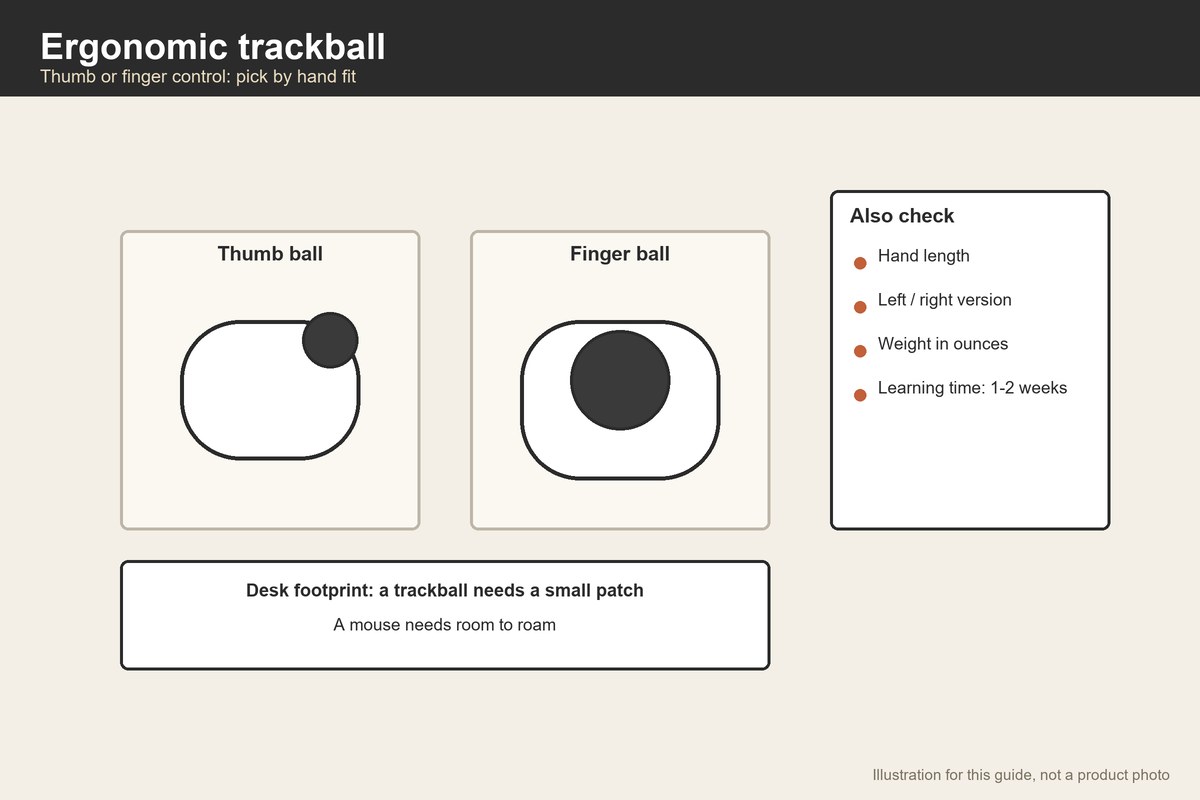
An ergonomic trackball is a pointing device whose body stays still while you move a ball with your thumb or fingers. It suits people who want to keep their arm still, who have little desk space or who want to vary how they use their hands. The first choice is thumb or finger control. The second is hand fit. The third is the learning curve, since most people need a week or two to feel natural with one.
OSHA’s workstation guidance lists trackballs among pointing devices, notes that pointer selection and placement is an important factor in a safe workstation and gives short tips: keep the pointer close to the keyboard, alternate hands where possible and use keyboard shortcuts. It does not rank devices. We have not tested any trackball, and comfort claims in listings are the makers’ claims.
This is general guidance, not medical advice. If you have pain, see a clinician.
Thumb or finger control
Thumb trackballs put the ball under your thumb. They are compact, usually lighter, and the fingers click. The thumbs tire in some people, and the ball’s position must suit your thumb length. The listings we opened include a thumb model of 4.5 ounces and another at 7.4 ounces with a stated battery life of 18 months.
Finger trackballs put the ball in the middle, moved by two or three fingers, often with a wrist rest. They are larger and heavier, such as a 12.7 ounce model we opened, and suit larger hands and long sessions. The larger ball may help with fine control.
Vertical thumb designs tilt the hand. One listing describes a 54 degree vertical thumb model at 5.3 ounces. Makers say vertical shapes reduce forearm twisting; that is a claim, and preferences differ.
Check your hand against the device
Measure your hand length and span, and compare with the device. A thumb should reach the ball without stretching, and your fingers should reach the buttons without lifting the palm. A device that is too small cramps; one that is too large strains the thumb. Try it in a shop if you can, or buy where you can return it.
Handedness matters. All the trackballs we opened are right-handed, though one listing shows an ambidextrous variant. Left-handed users should check before buying.
Weight, power and connection
Trackballs stay put, so weight matters less than for a mouse, but you may carry the device. The ones we opened weigh from 2.12 ounces (a small model with a 5 by 4 inch body) to 12.7 ounces. Power sources include batteries (one lists an 18 month average life), rechargeable cells and USB. Connection is Bluetooth, a USB receiver or wired. If you use two computers, look for multi-device switching; listings say so when it exists.
Space on the desk
A regular mouse needs a patch of desk to roam over. A trackball does not, which helps on narrow tables. See table ergonomics for keyboard and screen placement, and best folding desks for small spaces if your desk is tiny. Keep the trackball close to the keyboard, as the workstation guidance advises.
Learning curve
Expect clumsiness at first. Fine control comes after days, not minutes. Set the pointer speed low, use the buttons you find natural and give it two weeks. If your wrist or thumb hurts, stop and change the position, size or device. Alternating hands, where the guidance suggests it, means you could keep a regular mouse for the other hand.
Cleaning
Balls collect skin oil and dust. Pop the ball out and wipe the cup and the ball. A weekly wipe keeps the tracking smooth. If the ball rolls roughly, clean it before assuming a defect.
A worked example
These are invented desk numbers for planning. Your desk is 24 inches deep with a 6 inch monitor base at the back and a keyboard 18 inches wide and 5 inches deep at the front. A mouse pad measures 9.5 by 7.9 inches, or 75 square inches (9.5 × 7.9 = 75.05).
A trackball with a 5 by 4 inch body, like the small model we opened, needs 5 × 4 = 20 square inches. That is 20 ÷ 75 = 27 percent of the mouse pad’s area, so it frees 75 − 20 = 55 square inches.
Reach: placing the trackball 3 inches from the keyboard’s right edge, the total width of keyboard and trackball is 18 + 3 + 4 = 25 inches. If your desk is 40 inches wide, you keep 40 − 25 = 15 inches spare on the sides. If you used the 12.7 ounce finger model at an assumed 5 by 6 inches, the width becomes 18 + 3 + 5 = 26 inches; the difference is 1 inch.
So the small trackball saves desk area more than width. If your desk is wide, size is a comfort choice, not a space one.
Choosing by hand size
Measure your hand from the wrist crease to the tip of the middle finger, and across the knuckles. Compare the numbers with the trackball’s length and width if the listing gives them. The small model we opened has a body of 5 by 4 inches, which suits smaller hands or travel; the larger finger models are heavier and suit bigger hands. A thumb ball should be reachable with your thumb slightly bent, not stretched.
Where the device sits
Place the trackball beside the keyboard on the side of your dominant hand, with the forearm relaxed. The workstation guidance suggests keeping the pointer close to the keyboard, alternating hands where you can and using shortcuts. If you alternate hands, get a device or shape that suits both, or keep a regular mouse on the other side.
Comparing thumb and finger models on weight and connection
The thumb models we opened weigh 4.5 and 7.4 ounces, and the small one 2.12 ounces. The finger model weighs 12.7 ounces. A heavier device stays put on the desk; a lighter one may shift. Connection options include Bluetooth, a USB receiver and wired. If you switch between computers, look for a device with multiple Bluetooth slots.
Habit changes that help
A trackball changes how you move, so combine it with a few habits. Keep your shoulder relaxed. Do not grip the device. Move your whole hand a little instead of straining a single finger. Take short breaks. If the discomfort continues after adjusting, see a clinician.
A quick decision path
If your desk is narrow and your hands are small, try a compact thumb trackball. If your hands are large and you work for hours, try a finger trackball with a wrist rest. If you switch between computers, choose multi-device Bluetooth. If you are unsure, buy where returns are easy and give each two weeks. Write down what you notice about your thumb, fingers, wrist and shoulder, and choose from the notes.
Reading the listing for fit
Look for length and width in inches, weight in ounces, and whether the device has a wrist rest. A finger trackball of about 12.7 ounces stays put on a desk, while a 2 ounce model may move. If the ball is 2 inches across, expect to use two or three fingers; if it is about 1.3 inches, expect a thumb. Compare those numbers with your hand, not with a friend’s recommendation, since the best trackball for one hand is the wrong size for another.
Alternating hands and mixed setups
The workstation guidance suggests alternating the hand that operates the pointer when you can. A simple way is to keep a trackball on one side and a regular mouse on the other and switch during the day. If you do this, keep both devices the same distance from the keyboard, and set the pointer speeds so the switch does not feel jarring. Some people also use the keyboard’s shortcuts to cut down on pointing altogether, which the guidance recommends.
Mistakes to avoid
- Judging on day one. Give it two weeks.
- Buying for space alone. Fit matters more.
- Ignoring handedness. Check the variant.
- Skipping cleaning. Dust changes tracking.
- Placing it far from the keyboard. Keep it close.
- Expecting a cure. Comfort varies; see a clinician for pain.
When to skip a trackball
If your discomfort comes from a table that is too high or a screen that is too far, adjust the workstation first. If you draw or do precise pointing work, a pen tablet or regular mouse may suit better.
Related guides
See comfortable computer mouse, gaming trackball mouse and table ergonomics.
Frequently asked questions
Is a trackball better than a mouse?
Neither is better for everyone. A trackball keeps your arm still and saves space; a mouse is more familiar.
Thumb or finger trackball?
Thumb designs are compact and light; finger designs are larger and suit big hands. Try both if you can.
How long to get used to one?
Many people need a week or two. Judge after that.
Are trackballs wireless?
Many are, with Bluetooth or a USB receiver, and some are wired.
Do trackballs cure wrist pain?
We can’t say. Ask a clinician if you have pain.
Bottom line
An ergonomic trackball is worth trying if you want to keep your arm still or save desk space. Choose thumb or finger control by hand fit, keep it near the keyboard and allow two weeks to adapt.
Products worth checking
We have not tested these products. Sizes and features come from the Amazon listings, checked on September 30, 2026; where a listing does not say, we say so.
Logitech Ergo M575S Wireless Bluetooth Trackball Mouse
The listing gives 7.4 oz; 18 month battery. We re-opened the page on September 30, 2026 and found these figures; other details are on the product page.
- Good for: a thumb trackball for everyday work.
- Keep in mind: it is right-handed only in this listing.
Nulea M501 Wireless Trackball Mouse, Ergonomic Thumb Control
The listing gives 4.5 oz; Bluetooth and 2.4G USB. We re-opened the page on September 30, 2026 and found these figures; other details are on the product page.
- Good for: a light thumb trackball with adjustable DPI.
- Keep in mind: the page shows an ambidextrous variant among others, so pick the one you need.
TECKNET Wireless Trackball Mouse, Bluetooth
The listing gives 5 x 4 in; 2.12 oz. We re-opened the page on September 30, 2026 and found these figures; other details are on the product page.
- Good for: a very small, light trackball.
- Keep in mind: the listing shows a very short battery life figure, so check it before buying.
Sources checked
- Computer Workstations eTool: Pointer/Mouse
- Logitech Ergo M575S Wireless Bluetooth Trackball Mouse
- Nulea M501 Wireless Trackball Mouse, Ergonomic Thumb Control
- TECKNET Wireless Trackball Mouse, Bluetooth
Specifications checked on September 30, 2026. Product details and availability can change, so confirm on the product page before you buy.