As an Amazon Associate I earn from qualifying purchases. Links marked “Affiliate link” may earn us a commission at no extra cost to you. Learn more.
Quick answer
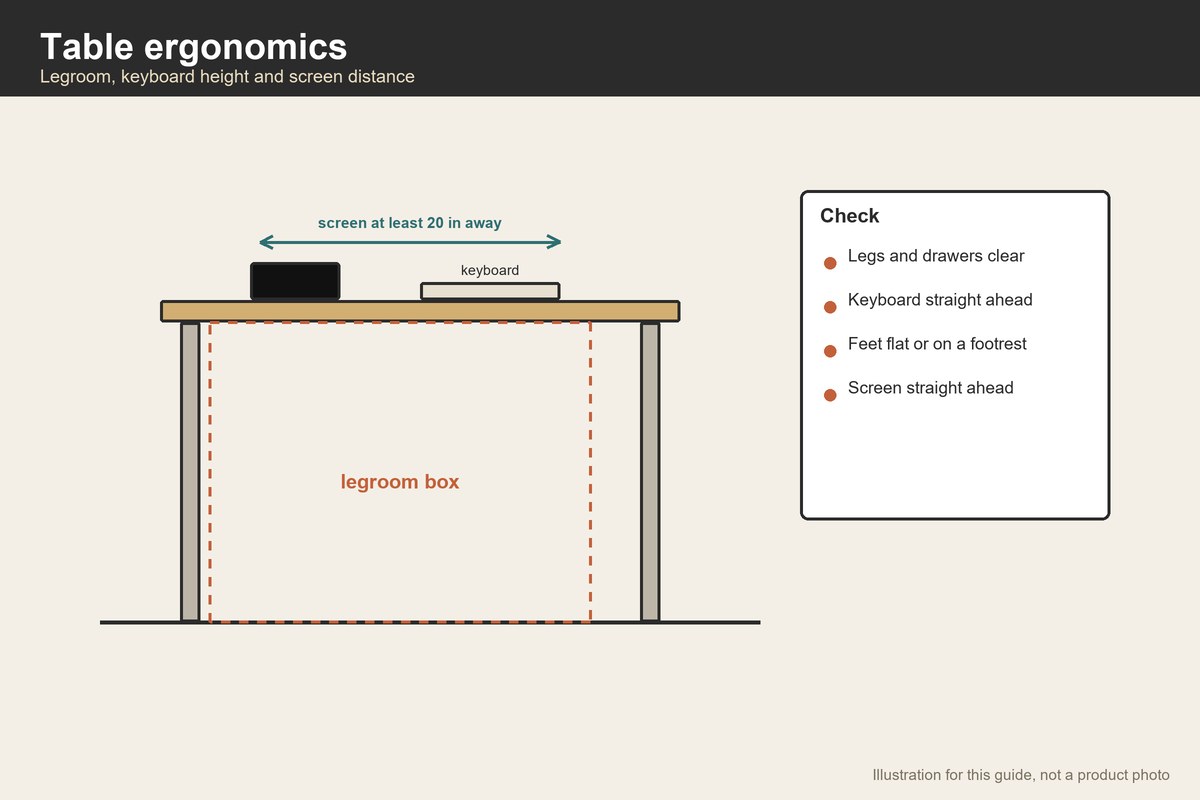
Good table ergonomics come from four checks: enough legroom under the surface, the keyboard and mouse close and straight in front of you, the screen at a comfortable distance, and the chair height set so your feet rest on the floor. Federal workplace guidance gives concrete numbers for legroom: at least 20 inches wide, 17 inches deep at knee level, 24 inches deep at foot level and 4 inches high at the foot, with the height of the space under the surface adjustable between 20 and 27 inches near the user.
The same guidance says the desk surface should let you place the monitor directly in front of you, at least 20 inches away, and advises against storing items such as a computer tower under the desk. Its keyboard guidance says to put the keyboard directly in front of you with relaxed shoulders, elbows close to the body and wrists straight and in line with the forearms.
This is general workplace guidance, not medical advice. If you have pain, talk to a clinician or an occupational therapist.
Start with legroom, because a table can cost you here
A dining table or a desk with a wide apron can look fine and still squeeze your legs. The government guidance describes a minimum box under the work surface: 20 inches wide, 17 inches deep at knee level, 24 inches deep at foot level and 4 inches high at the foot. It was designed to fit the majority of users, from a small woman at the 5th percentile to a large man at the 95th.
Measure your table. Kneel or sit and measure the open width between legs, the depth from the front edge to the nearest obstacle at knee height and again at foot height, and the vertical gap between the seat and the underside. A drawer, a modesty panel, a crossbar or a cabinet can each eat into the box. If your table fails, move a drawer unit aside, take off a low crossbar or choose a different table.
The keyboard and mouse
Keep the keyboard and the mouse close to each other and directly in front of you. The keyboard guidance says shoulders relaxed, elbows near your sides and wrists straight. The mouse guidance says to keep the pointer close to the keyboard, alternate hands when you can and use keyboard shortcuts to reduce extended use.
On many tables the surface is too high for a straight-wrist posture when the chair is at the right height for your feet. Two fixes are common. Raise the chair and add a footrest, or lower the keyboard on an under-table tray. A tray is a small purchase and sits under the tabletop.
The screen
The desk guidance sets 20 inches as the minimum distance between you and the monitor. Place the screen directly in front so you do not twist your neck. If the table is shallow, a wall-mounted or arm-mounted screen can gain distance. If the screen is a laptop, a stand and a separate keyboard let you raise the screen without raising your hands.
The chair and the table together
The chair guidance says the seat should be comfortable and allow your feet to rest flat on the floor or on a footrest. The table then has to be at a height that lets your forearms rest level. If both cannot be met, the usual compromise is a footrest, a keyboard tray or an adjustable-height table. See what height should a desk be for more on desk height.
What to buy, in order of cost
- Nothing. Clear the space under the table and set the chair right.
- A keyboard tray. It lowers the keyboard and mouse below the tabletop.
- A footrest if the chair cannot go low enough.
- An adjustable-height table if several people use the same surface or you want to change postures.
Start with the cheapest fix that solves your problem.
Adjustable height and small spaces
An adjustable-height desk changes the tabletop height for sitting and standing. The listing we read for a compact model gives a 32 by 19 inch top and a height range of 28.3 to 46.5 inches. It is small, and 19 inches deep is close to the 20 inch monitor distance from the desk guidance, so a laptop or a small screen fits better than a large monitor. See best standing desks for small spaces for more.
A worked example
These are invented numbers for planning. You use a table 30 inches high with a 1 inch top and a 3 inch apron. The underside of the apron is at 30 − 1 − 3 = 26 inches from the floor.
Legroom height: with a chair seat at 18 inches, the space between the seat and the apron is 26 − 18 = 8 inches. The guidance lists an adjustable height of 20 to 27 inches for the clearance under the surface near the user; as we read its figure, a 26 inch underside falls inside that range, but check the figure on the page for your own case.
Depth: the table is 24 inches deep. A drawer unit 6 inches from the back reduces the depth at knee level from 24 inches to 24 − 6 = 18 inches, which is still above the 17 inch minimum. At foot level, you need 24 inches; the table is 24 inches deep, so you have no margin: any object under it reduces the space.
Screen distance: the table is 24 inches deep and the monitor is 6 inches deep at the base. Placing it at the back leaves 24 − 6 = 18 inches to the front edge, so with your body 4 inches from the edge you are 22 inches from the screen, above the 20 inch minimum.
Verdict: the table passes on all three, but only just. A keyboard tray would help wrist posture.
Setting it up step by step
Do this in order, and change only one thing at a time so you can tell what helped. First, sit at the table and put your feet flat, on the floor or a footrest. Second, place the keyboard directly in front of you and let your shoulders relax with your elbows near your sides. Third, check whether your wrists are straight and in line with your forearms; if they bend up, lower the keyboard or raise the chair with a footrest. Fourth, put the screen straight ahead at least 20 inches away and check that you are not tilting your head. Fifth, clear the space under the table so your knees and feet have room.
Shared tables and children
A dining table shared by adults and children rarely fits everyone. A child who sits on a regular chair at an adult table often has their feet dangling and their arms high, so a footrest and a cushion can help. Adults who use the same table for laptops should raise the screen and use a separate keyboard. If several people use one table, an adjustable-height table or a tray that moves in and out is more flexible than a fixed setup.
Breaks and variety
No setup is perfect for hours. The workstation guidance recommends allowing variety in posture, and many people set a reminder to stand or stretch at intervals. This article does not give medical advice; if you have pain, see a clinician.
Mistakes to avoid
- Using the table as storage underneath. It removes legroom.
- Placing the screen to one side. It twists your neck.
- Reaching for the mouse. Keep it near the keyboard.
- Raising the chair without a footrest. Feet should rest on something.
- Buying gadgets first. Measure and rearrange before buying.
When to skip a purchase
If your table passes the legroom and screen checks and your wrists are straight, you may not need anything. If you sit for long periods, changing posture and taking breaks matter more than any accessory.
Related guides
See what size desk for a small room, small home office checklist and cable management for a small desk.
Frequently asked questions
How much legroom does a table need?
A government workplace guide gives at least 20 inches wide, 17 inches deep at knee level, 24 inches deep at foot level and 4 inches high at the foot.
How far should the screen be?
At least 20 inches according to the same guide’s desk page.
Do I need a keyboard tray?
Only if your wrists bend up when your chair is at the right height. Try adjusting the chair and a footrest first.
Is a standing desk better?
It gives you a way to change posture, but posture variety matters more than the desk itself.
Is this medical advice?
No. It is general guidance. See a clinician if you have pain.
Bottom line
Table ergonomics start with legroom, then the keyboard, mouse and screen. Measure your table against the published clearances, fix the cheap things first and add a tray or an adjustable table only if you still need it.
Products worth checking
We have not tested these products. Sizes and features come from the Amazon listings, checked on September 30, 2026; where a listing does not say, we say so.
HUANUO 32×19 Inch Small Electric Standing Desk, Adjustable, Light Walnut
The listing gives 19 x 32 x 28 in (D x W x H); 24.5 lb. We re-opened the page on September 30, 2026 and found these figures; other details are on the product page.
- Good for: a compact adjustable table for sitting and standing.
- Keep in mind: 19 in deep is close to the 20 in screen distance in the workplace guide, so a large monitor will not fit well.
VIVO Black Under Desk 25 x 10 in Keyboard Tray, MOUNT-KB03B
The listing gives 10 x 25 x 0.5 in; 12.25 lb. We re-opened the page on September 30, 2026 and found these figures; other details are on the product page.
- Good for: lowering the keyboard below a high tabletop.
- Keep in mind: the listed weight seems high for a tray and may include hardware, and the tray needs a table edge it can clamp or screw into.
HUANUO Under Desk Keyboard Tray, 360 Degree Adjustable Mouse Platform
The listing gives 25 x 9.84 x 3.54 in; 11.54 lb. We re-opened the page on September 30, 2026 and found these figures; other details are on the product page.
- Good for: a tray with a mouse platform and wrist rest.
- Keep in mind: check that your table’s underside can take the mounting hardware.
Sources checked
- Computer Workstations eTool: Work Space
- Computer Workstations eTool: Desks
- Computer Workstations eTool: Keyboards
- Computer Workstations eTool: Pointer/Mouse
- Computer Workstations eTool: Chairs
- HUANUO 32×19 Inch Small Electric Standing Desk, Adjustable, Light Walnut
- VIVO Black Under Desk 25 x 10 in Keyboard Tray, MOUNT-KB03B
- HUANUO Under Desk Keyboard Tray, 360 Degree Adjustable Mouse Platform
Specifications checked on September 30, 2026. Product details and availability can change, so confirm on the product page before you buy.