As an Amazon Associate I earn from qualifying purchases. Links marked “Affiliate link” may earn us a commission at no extra cost to you. Learn more.
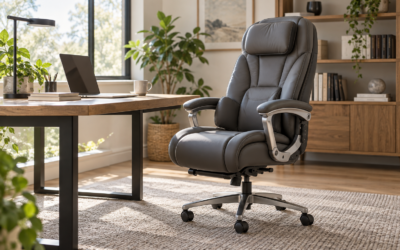
No chair treats back pain, but a chair with the right adjustments lets you sit in a better position for long hours. For that job, the features that matter are adjustable lumbar support, adjustable seat depth, a recline you can lock, and armrests that move. Of the three we compared, the Branch Ergonomic Chair Pro lists the most adjustment points (14), the XiGoal S9 states the widest user range (5 ft 3 in to 6 ft 5 in, up to 300 lb) with a 3-zone lumbar, and the HUANUO with 6D armrests adds a headrest and four recline angles.
This is general information, not medical advice. If you have pain that is severe, lasts, or spreads down a leg, see a health professional. We have not tested these chairs. Specifications come from the Amazon listings, checked on September 29, 2026, and we say where a listing does not state something.
What to look for, by what you notice
| If you notice | Look for | Why |
|---|---|---|
| A gap between your lower back and the backrest | Lumbar support that moves up and down | OSHA says lumbar support should be height adjustable so it can be placed to fit the lower back |
| Pressure on the back of your thighs or knees | Seat depth adjustment, and a rounded seat edge | OSHA says the seat should support most of the thigh without the knee touching the front edge |
| Stiffness after long focused work | A recline you can lock in more than one angle | OSHA says the chair should recline at least 15 degrees from vertical, and that changing position is healthy |
| Tight shoulders while typing | Armrests that adjust in height, and preferably width | OSHA says armrests should be low enough that your shoulders stay relaxed |
| Feet dangling | A low minimum seat height, or a footrest | See our guide to numb feet and our footrest guide |
Three adjustable chairs compared
| Branch Ergonomic Chair Pro | XiGoal S9 | HUANUO with 6D Armrests | |
|---|---|---|---|
| Lumbar (as listed) | Padded two-way cushion, adjusts vertically | 3-zone lumbar, adjusts vertically and up to 1.57 in in depth | Adjusts up and down |
| Seat depth (as listed) | Not stated in the bullet points we read | Adjustable, about 1.57 in of travel | Seat-depth adjustment listed, range not stated |
| Recline (as listed) | Tilt tension and forward-tilt seat | Reclines from 90 up to 140 degrees (90, 115 and 140 named) | Locks at 95, 104, 114 or 123 degrees |
| Armrests (as listed) | 5D: height, width, depth, pivot, pad position | 6D: height, depth, pivot, rotation, tilt-up | 6D: height, depth, width, tilt, rotate |
| Headrest | Not stated in the bullet points we read | 4D: height, depth, rotation | 3D |
| Stated user range | Not stated in the bullet points we read | About 5 ft 3 in to 6 ft 5 in, up to 300 lb | Not stated in the bullet points we read |
| Best for | Fine-tuning with many adjustments | Taller or heavier users who want a wide fit range | Users who want a headrest and armrest adjustment |
The listings give recline angles that appear to be measured between the seat and the backrest. If so, 105 degrees or more corresponds to about 15 degrees of recline from upright, which is the minimum OSHA describes. Check how the maker measures the angle.
The three chairs
Branch Ergonomic Chair Pro
The listing describes 14 points of adjustment, a padded two-way lumbar cushion that moves vertically, 5D armrests, a tilt with adjustable tension, a forward-tilt seat for active sitting and a molded high-density foam cushion.
- Good for: someone who wants to tune many settings and shifts between upright and forward-leaning work.
- Keep in mind: the bullet points we read do not give the seat-depth range, the user range or the weight limit, so check these on the product page.
XiGoal S9 Ergonomic Office Chair with 3-Zone Lumbar Support
The listing describes a 3-zone lumbar that adjusts vertically and up to 1.57 inches in depth, adjustable backrest height and seat depth (1.57 inches), 6D armrests, a 4D headrest and a recline from 90 to 140 degrees. It states the chair is for people from 5 ft 3 in to 6 ft 5 in and supports up to 300 lb, with SGS and TUV certifications.
- Good for: a taller or heavier user, or someone who wants lumbar, headrest and arm adjustment in one chair.
- Keep in mind: it is a large, high-back chair, so check the depth and the space behind your desk, and it is not the one for a very small room.
HUANUO Ergonomic Office Chair with 6D Armrests and Lumbar Support
The listing describes a lumbar system that moves up and down, a 3D headrest, seat-depth adjustment, 6D armrests that slide, tilt and rotate, four lockable recline angles from 95 to 123 degrees and rubber casters said to glide on hardwood, tile and carpet.
- Good for: someone whose shoulders and neck tire during long typing sessions and who wants headrest and armrest adjustment.
- Keep in mind: the seat-depth range and the weight limit are not stated in the text we read.
How to choose for long hours
- Fit comes before features. A chair that suits 5 ft 4 in to 6 ft users does not suit everyone. Look for the stated user range and the weight limit, and treat their absence as missing information.
- Check the seat depth range, and use our seat fit check to see whether your seat suits your legs.
- Match the chair to the desk. A chair with big adjustable arms may not tuck under a small desk. See our guide to arms and chair fit checker.
- Look at the recline and how it locks. A lock lets you hold a position instead of rocking.
- Read the warranty and the seller, since moving parts wear out.
- Do not rely on the chair alone. OSHA says sitting in one posture for long periods is not healthy, so plan to stand and move. See our all-day setup checklist.
For compact chairs, see our small-space chair guide. For a headrest and shoulder comfort, see our guide to the best office chair for neck and shoulder pain.
Frequently asked questions
What is the best office chair for back pain?
There is no single best chair. Look for lumbar support that adjusts in height, an adjustable seat depth, a lockable recline and armrests that move, and make sure the size suits you.
Can an office chair cure back pain?
No. A chair can help you sit in a better position, but pain that is severe, persistent or spreading needs a health professional.
Is lumbar support important?
OSHA says a chair should have lumbar support that is height adjustable so it fits your lower back.
How long can I sit in an ergonomic chair?
There is no set limit. OSHA says sitting still for long periods is not healthy, so change position and stand up regularly.
Do mesh chairs help with back pain?
Mesh is breathable, but comfort depends on the shape, adjustments and how well the chair fits you.
Specifications checked on September 29, 2026. Product details and availability on Amazon can change, so confirm size and features on the product page before you buy.
Related guides
- Best Computer Desks for Small Spaces
- Best Office Chairs for Small Spaces
- Office Chair With or Without Arms? How to Choose for a Small Desk
- Best Ergonomic Office Chairs: 7 Adjustable Options Compared
- Best Gaming Chairs for Adults: 3 Ergonomic Options and Floor Space Compared
- Mid-Century Modern Desks for Small Spaces: 3 Wood Desks Compared
- Small Home Office Checklist: 19 Things to Check Before You Buy