As an Amazon Associate I earn from qualifying purchases. Links marked “Affiliate link” may earn us a commission at no extra cost to you. Learn more.
Neck and shoulder strain at a desk usually comes from two places at once: where your screen is and where your arms rest. A chair can help with the second and, if it has a headrest, part of the first, but it cannot fix a screen that is too low or too far. Of the three chairs we compared, the Ticova lists the most headrest and armrest movements, the Marsail states the most precise lumbar ranges with flip-up arms, and the XiGoal S9 adds a four-way headrest and six-way arms for a wider range of users.
This is general information, not medical advice. Pain that is severe, lasts, or comes with numbness or weakness needs a health professional. We have not tested these chairs. Specifications come from the Amazon listings, checked on September 29, 2026, and we say where a listing is silent.
Check your screen angle before you shop
OSHA says the top of the monitor should be at or slightly below eye level, the center of the monitor should be about 15 to 20 degrees below horizontal eye level, and the preferred viewing distance is 20 to 40 inches (OSHA monitor guidance). If your screen is much lower, your neck bends down for hours, whatever chair you sit in. Enter three measurements to check.
Screen angle check
Measure while seated in your usual posture: eye height above the desk, the center of the screen above the desk, and the distance from your eyes to the screen, all in inches.
Simple trigonometry using OSHA’s 15 to 20 degree figure for the center of the screen. It is a guide, not a diagnosis.
Three chairs compared
| Ticova High Back Chair | Marsail Ergonomic Chair | XiGoal S9 | |
|---|---|---|---|
| Headrest (as listed) | Height and angle, large curved foam | 2D adjustable | 4D: height, depth, rotation |
| Armrests (as listed) | 3D: height, angle, forward and back | 3D, flip up | 6D: height, depth, pivot, rotation, tilt-up |
| Lumbar (as listed) | Height and depth | 1.18 in forward and back, 2.16 in up and down | 3-zone, vertical plus up to 1.57 in in depth |
| Recline (as listed) | Tilt up to 130 degrees | 90 to 120 degrees | 90 to 140 degrees |
| Seat (as listed) | 3.4 in high-density foam, waterfall edge | 3.14 in foam, 330 lb | Seat depth adjustable about 1.57 in |
| Stated user range or weight | Not stated in the bullet points we read | 330 lb | 5 ft 3 in to 6 ft 5 in, up to 300 lb |
| Best for | Detailed headrest and arm setup | Precise lumbar with flip-up arms | Tall or heavier users |
The three chairs
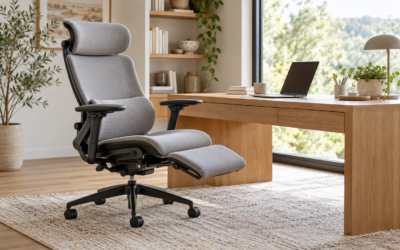
Ticova Ergonomic Office Chair, High Back with Headrest and 3D Armrests
The listing says the lumbar support adjusts in height and depth, the headrest in height and angle, the armrests in height, angle and forward and back, and the tilt goes up to 130 degrees. It describes a 3.4-inch high-density foam seat with a W-shaped, waterfall edge and a large curved foam headrest.
- Good for: someone who wants a headrest that moves in two ways and arms that move in three.
- Keep in mind: the bullet points we read give no user range or weight limit, and the warranty wording is general.
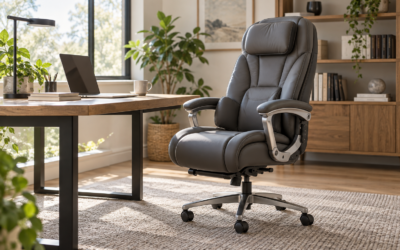
Marsail Ergonomic Office Chair with 2D Headrest and 3D Armrests
The listing gives a lumbar that moves 1.18 inches forward and back and 2.16 inches up and down, a 2D headrest, a backrest that reclines from 90 to 120 degrees, 3D armrests that flip up, a 3.14-inch high-density foam seat and a 330 lb rating.
- Good for: someone who wants a stated lumbar range and arms that flip up to slide under a desk.
- Keep in mind: the headrest moves in only two directions, and the bullet points we read do not give a user height range.
XiGoal S9 Ergonomic Office Chair with 4D Headrest and 6D Arms
The listing describes a headrest that adjusts in height, depth and rotation, 6D armrests that move in height, depth, pivot, rotation and tilt-up positions, a 3-zone lumbar and a recline to 140 degrees. It states a user range of 5 ft 3 in to 6 ft 5 in and a 300 lb limit.
- Good for: a taller or heavier person, or anyone who wants the widest headrest and arm adjustment in this group.
- Keep in mind: it is a large high-back chair that needs space behind the desk, and more adjustments mean more to set up.
How to choose for neck and shoulder comfort
- Fix the screen first. Use the tool above. If you need to raise the screen, see our monitor stand guide and monitor arm guide.
- Check the armrests. OSHA says armrests should be low enough that your shoulders are relaxed and should just make contact with your lower arms when they hang comfortably at your sides. If they lift your shoulders, lower them or remove them. See our guide to arms.
- Use the headrest for reclining. A headrest supports your head when you lean back to read or think. It does little when you sit upright at a keyboard.
- Match the desk height to your body. A desk that is too high raises your shoulders. Use our desk height calculator.
- Check the size range and weight. A chair that is too big or small for you cannot support your neck and shoulders properly.
- Keep moving. OSHA says staying in one posture for long periods is not healthy. See our setup checklist.
Frequently asked questions
Do I need a headrest for neck pain?
Not necessarily. A headrest helps when you recline. For keyboard work, the position of the screen and your arms matter more.
How high should my monitor be for neck comfort?
OSHA says the top of the monitor should be at or slightly below eye level and the center about 15 to 20 degrees below horizontal eye level.
Can armrests help with shoulder pain?
Armrests that support your lower arms and let your shoulders relax can help some people. Armrests set too high can make it worse.
What chair features matter for neck and shoulders?
An adjustable headrest for reclining, armrests that adjust in height and width, and a chair size that fits you.
When should I see a doctor about neck or shoulder pain?
If the pain is severe, persistent, or comes with numbness, weakness or pain that spreads, see a health professional.
Specifications checked on September 29, 2026. Product details and availability on Amazon can change, so confirm size and features on the product page before you buy.
Related guides
- Best Computer Desks for Small Spaces
- Best Office Chairs for Small Spaces
- How to Sit at a Desk All Day: A Simple Chair and Desk Setup Checklist
- Best Office Chairs for Tall People: Seat Height and Depth Compared
- Task Chair vs Executive Chair: Which Fits a Small Room?
- Best Standing Desk Converters for Small Desks: 3 Options Compared
- How to Put a Desk in a Living Room and Hide the Workspace